A compressor is a decision about movement: which part of a sound should lead, which should settle back, and how quickly the level should recover. Buying ten different compressors will not answer those questions. Understanding what each design exposes can, however, make the right decision easier.
This selection covers ten useful approaches, from free digital control to models of FET, optical and variable-bias tube circuits. The numbering organizes the guide; it is not a measured quality ranking. We researched official product pages on 2 November 2026. We have not run listening panels, benchmarked these plugins, or verified their behavior in every host. Practical settings below are proposed exercises, not tested presets or claims of guaranteed results.
Prices and promotions vary by region, tax, account and bundle. We identify free versus paid licensing and quote only clearly displayed examples; follow the official link for the current checkout total. Compatibility must include your operating-system release, processor architecture, plugin format and DAW version. A VST3 file cannot simply be substituted for an AU in a saved Logic project.
How compression actually works
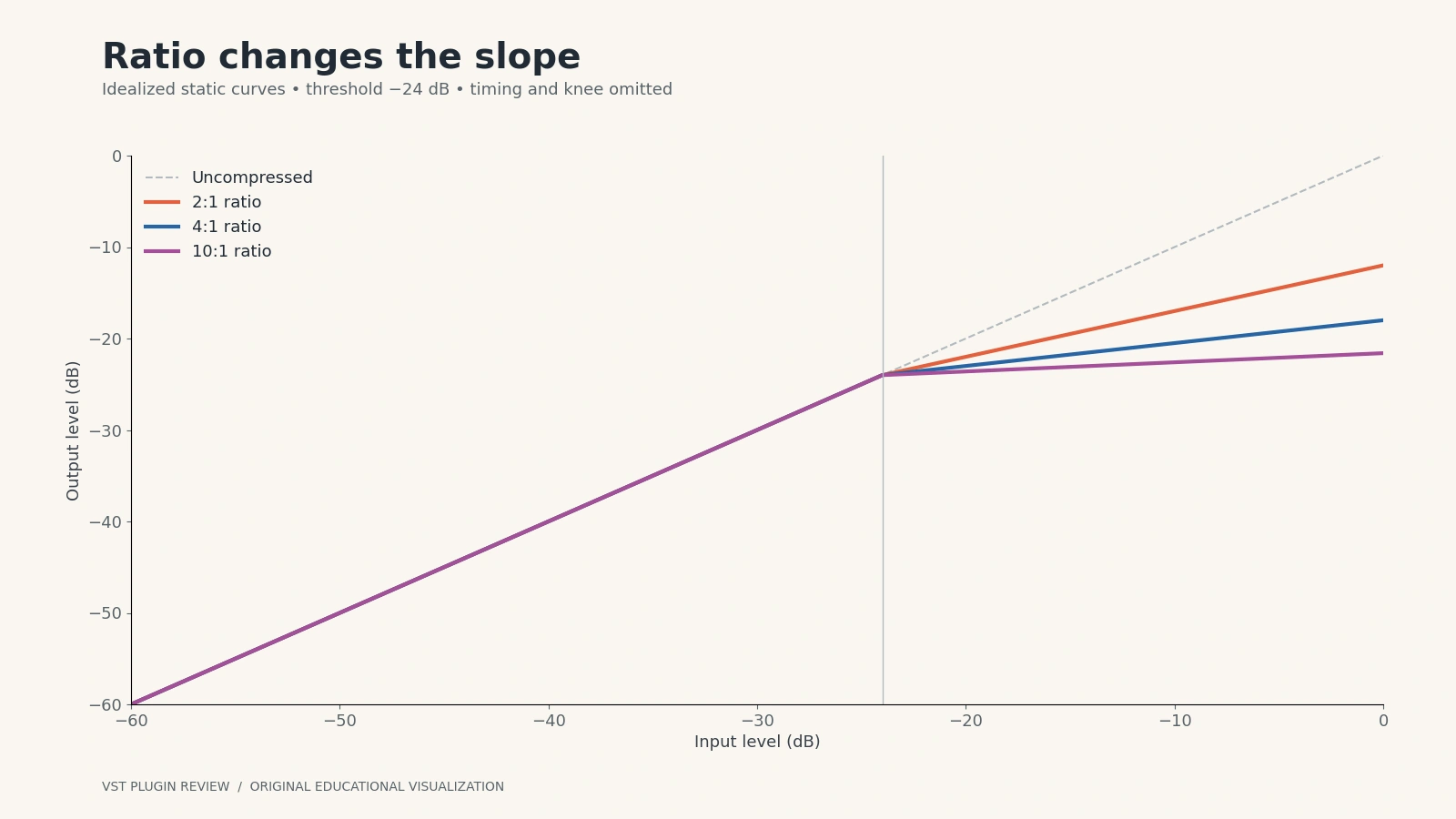
A downward compressor measures a signal and reduces gain when its detector exceeds a threshold. In a simplified steady-state example, a 4:1 ratio means an input rising 4 dB above threshold produces an output approximately 1 dB above threshold. It does not mean the entire track becomes four times quieter. Timing, knee, detector design and automatic behavior complicate that static picture.
Threshold determines where gain reduction begins. Lowering it usually makes more of the signal participate. If the meter never moves, the threshold may be above your peaks; if it never relaxes, it may be too low for the desired effect. Always adjust it against the actual input level rather than copying someone else's numerical value.
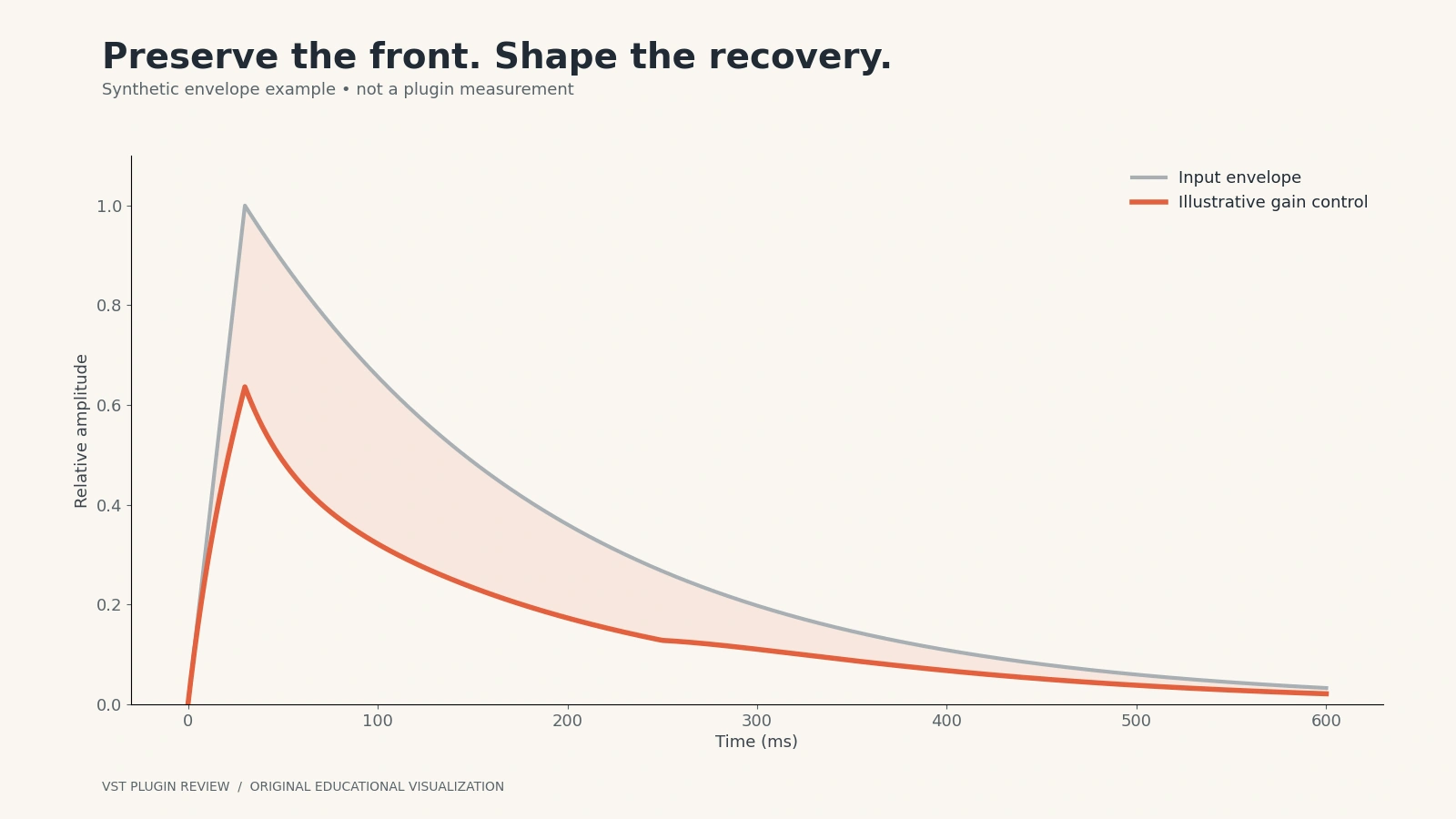
Ratio controls the slope above threshold. A gentle ratio can smooth a sustained part; a higher ratio can impose stronger control. But a slow high-ratio compressor can preserve an initial transient that a fast low-ratio setting softens. Ratio cannot describe the result on its own.
Attack determines how rapidly the compressor develops gain reduction. A slower attack often lets more of the initial drum transient through; a faster attack may restrain a sharp consonant or percussion peak. Attack is not necessarily a period of doing nothing followed by an instantaneous clamp. Manufacturers use different timing definitions.
Release determines recovery. Too short a release can produce modulation or distortion, particularly on low notes; too long can suppress the following beat. Listen to the space after a hit and to the next phrase. Automatic release adapts to the program according to the plugin's design, which can simplify setup but is not universally better.
Knee controls the transition around threshold. A softer knee introduces compression more gradually. Makeup gain raises the processed output to compensate for reduction; it can also fool you into preferring the louder version. Match bypass loudness before deciding that processing improves the sound. A compressor is not a substitute for sensible clip gain on a wildly uneven recording.
Transparent, character and circuit-inspired designs
Transparent processing aims to change dynamics without drawing attention to coloration. That is useful for an already finished-sounding mix or a recording whose tone you want to preserve. Character processing may deliberately add harmonics, alter transient shape, or make level changes conspicuous. Neither category is inherently more professional.
FET designs are associated with rapid gain control and expressive distortion when driven. VCA bus-compressor designs are often chosen for rhythmic cohesion. Optical designs use a light-dependent gain-control concept and can have program-dependent recovery. Variable-mu or variable-bias tube designs change gain through tube behavior and can provide both leveling and coloration. These are starting categories, not promises that every software model sounds alike.
Some plugins combine several behaviors or extend the original circuit with a mix control and detector filtering. Others are digital designs without a hardware ancestor. Judge the controls you need and the outcome in context. A convincing hardware story does not demonstrate better audio quality in your project.
Sidechain and parallel compression
The sidechain is the detector path: what the compressor listens to. Filtering bass out of that path can reduce excessive kick-triggered gain reduction without removing bass from the audible signal. An external sidechain can make a bass compressor respond to a separate kick. Set the amount by listening to whether the bass remains intelligible and the groove improves, not by chasing a dramatic meter.
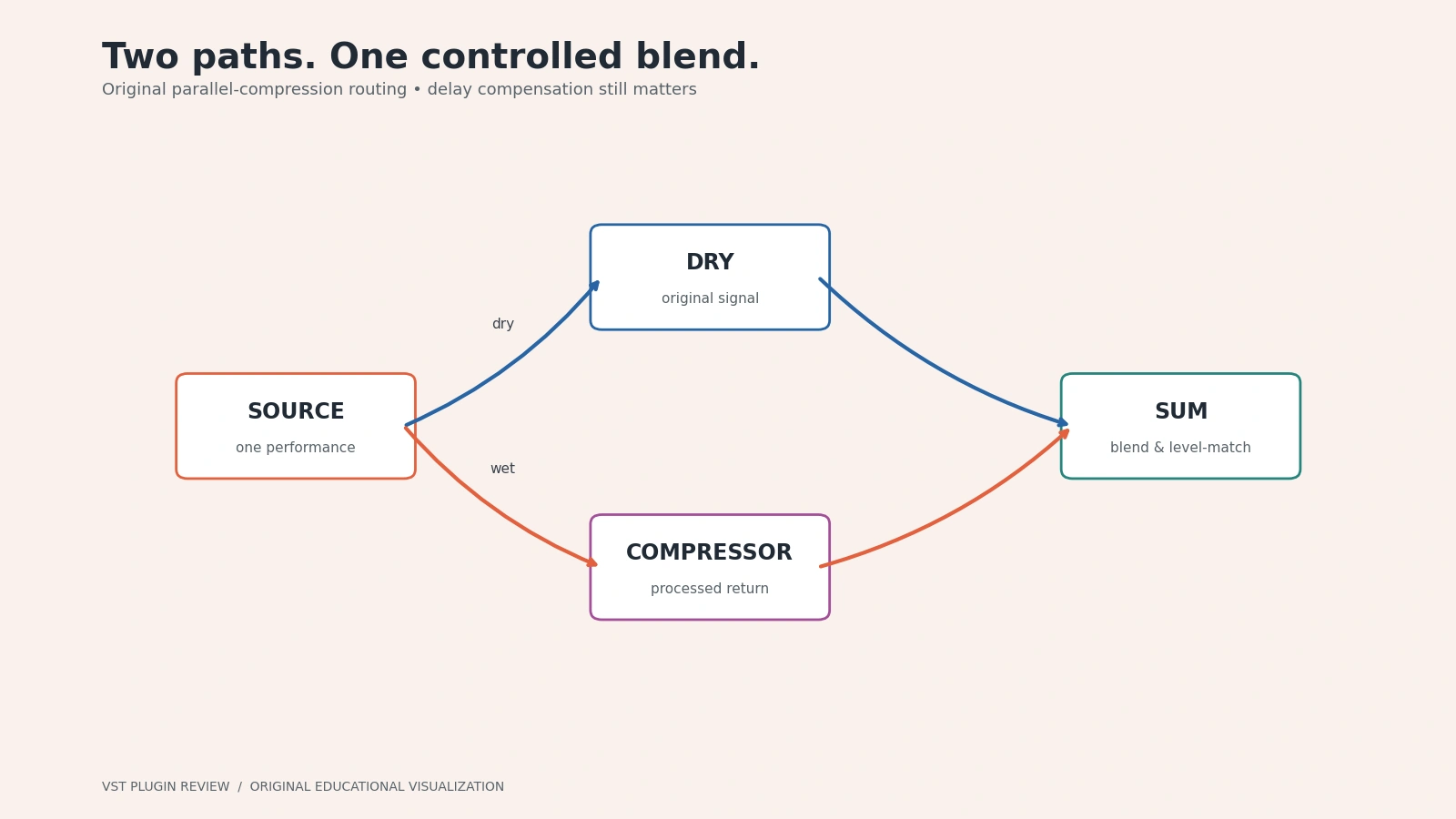
Parallel compression blends dry and compressed signals. It can increase sustain while retaining some original transient shape. Use a plugin's internal mix control or a correctly delay-compensated auxiliary route; careless duplicate routing can introduce phase problems. Start with the wet path quiet, bring it up until it contributes something useful, then loudness-match the combined result.
Comparison at a glance
| Plugin | Documented approach | Useful starting role | License | Main decision |
|---|---|---|---|---|
| FabFilter Pro-C 3 | Multiple digital styles and character modes | Flexible channel and bus work | Paid | Do you want extensive visual control? |
| TDR Kotelnikov | Original digital wideband design | Subtle stereo-bus dynamics | Free edition; paid GE | Do you need tone preservation rather than a circuit model? |
| Klanghelm MJUC | Three variable-tube models | Leveling and coloration | Paid | Will distinct models help or distract? |
| UAD 1176 Collection | Three 1176 variants | Fast channel and parallel compression | Paid | Which native or DSP entitlement do you need? |
| Waves CLA-76 | Two FET-inspired variants | Direct, characterful channel work | Paid | Does its focused control set suit you? |
| DMG Compassion | Configurable dynamics processor | Detailed dynamics design | Paid | Are you comfortable with deeper setup? |
| Cytomic The Glue | British console-bus model | Drum and mix buses | Paid | Do you want a focused bus workflow? |
| Softube Tube-Tech CL 1B mk II | Optical compressor model | Vocal and bass leveling | Paid | Can your system meet current requirements? |
| SSL Native Bus Compressor 2 | SSL G-Series bus heritage | Group and mix-bus cohesion | Paid | Are SSL workflow integrations useful? |
| Pulsar VM-Comp, formerly Mu | Variable-bias tube model | Bus tone and dynamics | Paid | Do you need extended sidechain and timing options? |
1. FabFilter Pro-C 3: flexible compression with visible control
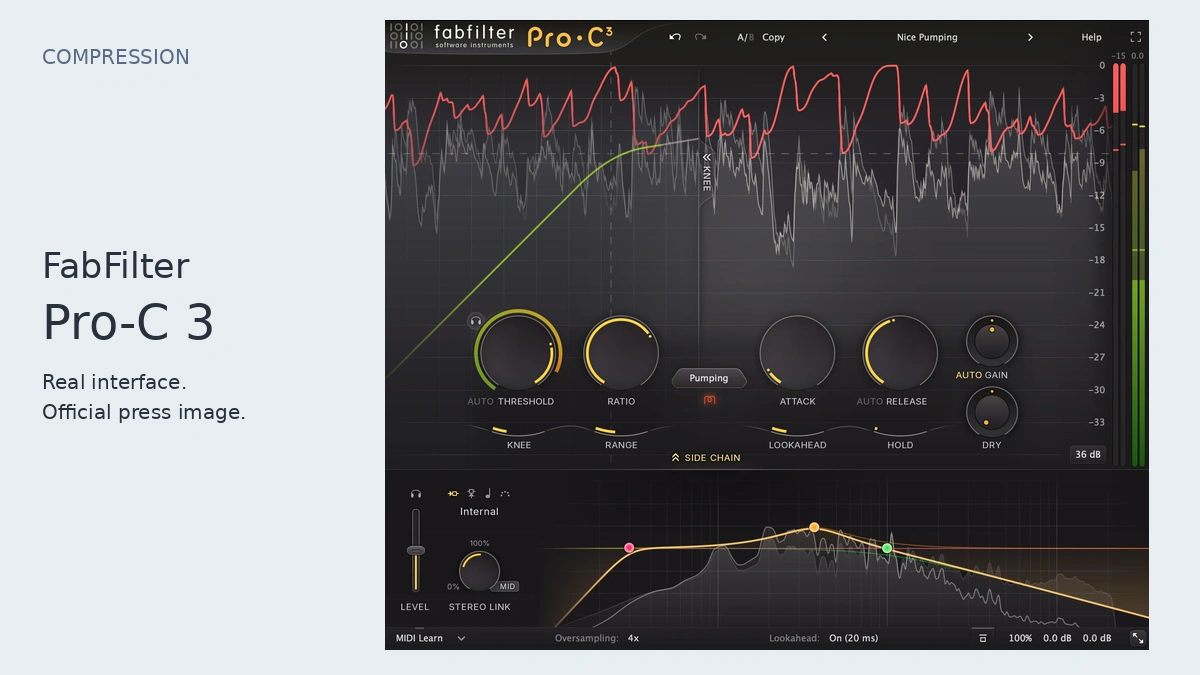
FabFilter's Pro-C 3 page documents fourteen compression styles, character options, external sidechain processing, lookahead, variable channel linking and up to 32x oversampling. Pro-C 3 is therefore a current product, rather than an assumed future version of Pro-C 2. Its visual interface and sidechain EQ are the distinctive reasons to consider it.
Best use: a producer seeking one configurable compressor for channels, groups and precise ducking. Strength: extensive detector and timing control in one interface. Limitation: that flexibility creates more decisions, and high oversampling or lookahead may introduce a different latency/resource tradeoff. We have not measured CPU usage.
Try this: on a vocal, choose a relatively clean style, begin at 3:1, use a moderate attack, then lower threshold until louder phrases receive a few decibels of reduction. Adjust release until it recovers between phrases. Listen to breaths and sibilance before increasing the amount. Buy it if the trial makes the visual workflow faster for you, rather than merely because it offers many modes.
Inspect the actual controls
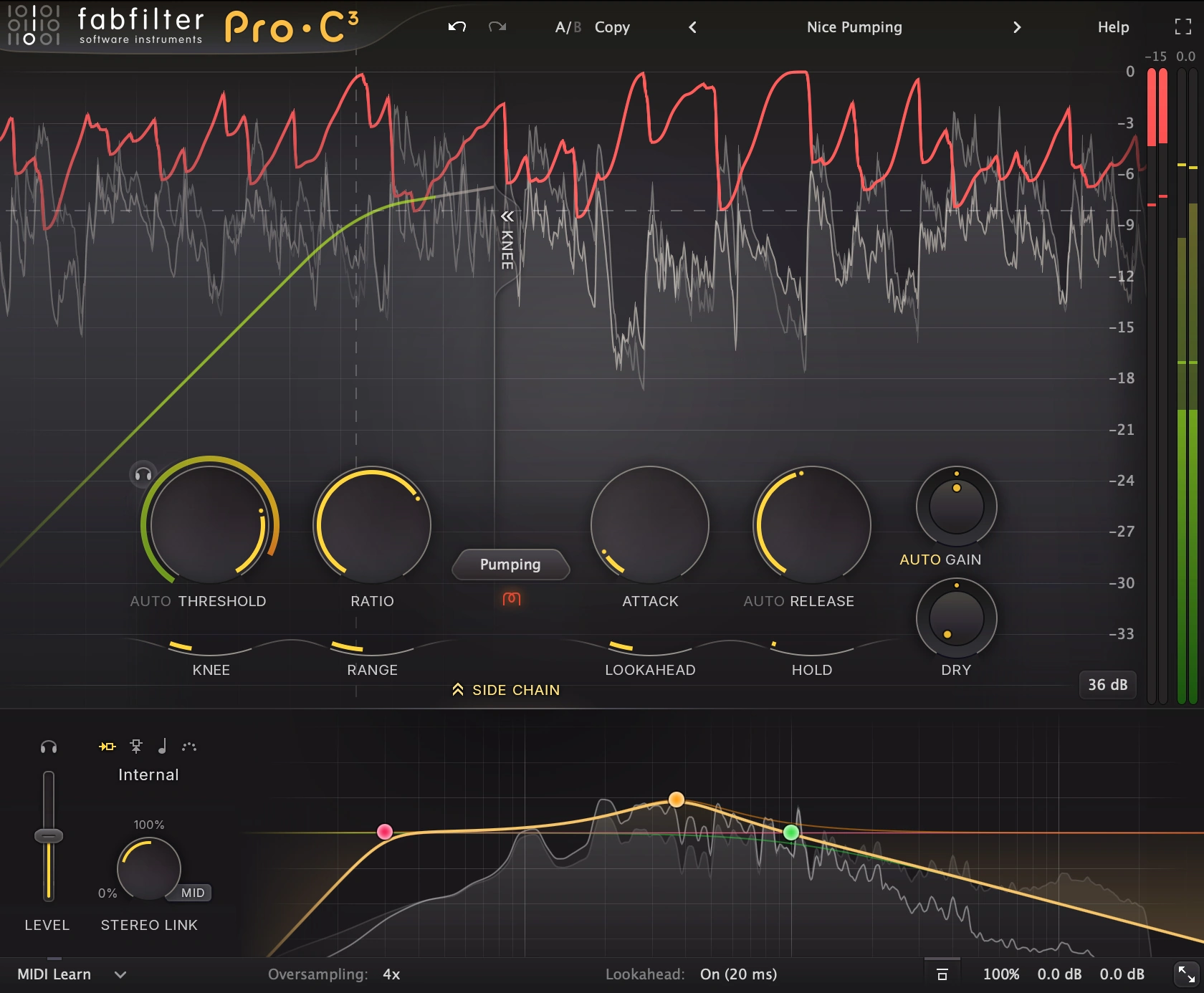
The manufacturer screenshot shows Pro-C 3’s real gain controls, compression display and metering in their original colors. Enlarge it to read labels. The interface image illustrates the product; it does not document a listening test or a preset used for this guide.
2. TDR Kotelnikov: free digital control for stereo material
Tokyo Dawn's Kotelnikov documentation describes an original digital wideband processor with separate peak and RMS release controls, sidechain high-pass filtering, stereo linking and a delta preview. The standard edition is a free download; the separate Gentleman's Edition is paid. This is not an emulation of a particular vintage box.
Best use: evaluating whether a bus needs controlled dynamics without deliberately choosing analog coloration. Strength: detailed detector behavior without a purchase. Limitation: independent peak and RMS controls require learning, and it is not intended to satisfy every saturation or circuit-modeling request.
Try this: begin on a stereo group at approximately 1.5:1 to 2:1. Set a threshold that causes modest reduction on loud passages, then compare different peak release settings while keeping the RMS recovery slower. Use delta monitoring to understand what changes, but return to the full mix for the final decision. Start here if your budget is limited and you are willing to read a manual.
3. Klanghelm MJUC: three ways to explore tube-inspired dynamics
Klanghelm's MJUC page identifies three variable-tube models with dedicated control sets, plus Drive and Timbre controls. The displayed price at research time was €24; tax and checkout terms still apply. Published requirements include Windows 10 or later, macOS 10.13 or later, and VST, VST3 and AAX, with AU on macOS.
Best use: exploring leveling and tone rather than only invisible peak management. Strength: different modeled approaches within a comparatively focused product. Limitation: controls differ between models, so a setting cannot be transferred numerically and assumed equivalent. Its coloration is a reason to audition it, not proof of improved sound.
Try this: on a bass line, begin with low Drive, use moderate compression and adjust the available time controls until note sustain becomes steadier. Raise Drive slightly, level-match, and ask whether the added harmonics help translation on small speakers. Buy if you want that interaction between tone and dynamics; use a clean digital compressor when preserving the existing timbre is the priority.
4. Universal Audio 1176 Classic Limiter Collection: choose the edition carefully
Universal Audio's current collection lists Rev A, Rev E and 1176AE models. The collection is paid, and UA's native and UAD DSP ecosystems make entitlement and compatibility checks important. Do not assume that a similarly named legacy plugin, a single model and the complete collection are interchangeable purchases.
Best use: fast compression on vocals, bass and parallel drums. Strength: comparing documented 1176 variants within one family. Limitation: its input-driven workflow differs from a conventional threshold control, and even a slower 1176 attack can be fast relative to other compressor designs. It is not the obvious choice when a long, freely adjustable attack is essential.
Try this: select 4:1, put attack toward its slower end and release relatively fast, then increase input until the loudest syllables are controlled. Compensate output carefully. For drums, try a separate parallel return before applying aggressive reduction to the entire bus. Buy only after confirming which edition runs on your computer and what its license actually includes.
5. Waves CLA-76: a focused FET-inspired channel tool
Waves describes CLA-76 as a FET-style compressor/limiter with Bluey and Blacky variants. It is a paid plugin; promotional and subscription offers are separate from a free, unrestricted license. Follow Waves' current compatibility and licensing guidance rather than relying on the age of the original product.
Best use: a quick character-compression workflow on individual sources. Strength: a small set of recognizable controls encourages decisions rather than extensive configuration. Limitation: a focused model lacks the detector shaping and routing flexibility of a modern general-purpose compressor. Two flavors also do not establish that one is best for every vocal.
Try this: on a snare return, begin at 4:1, use the slower attack direction, and set release to recover before the next hit. Adjust input for the desired movement and reduce output to compensate. Compare the two variants at equal loudness. Buy if that directness helps you finish tracks and the current license/update arrangement fits your studio.
6. DMG Audio Compassion: detailed dynamics for deliberate users
DMG Audio's Compassion page presents a configurable dynamics processor rather than a single fixed vintage model. Its compression/expansion modes, main and advanced views, and Mods configuration system make it worth investigating when ordinary controls do not expose the behavior you want. It is paid software with Windows and macOS installers and VST/VST3, AU on Mac, and AAX options; consult the current installer and manual for your system.
Best use: engineers interested in constructing dynamics behavior with more precision. Strength: a deeper design scope than a deliberately minimal compressor. Limitation: complexity can slow a simple session. Do not buy deep controls as a substitute for identifying whether the problem is peaks, sustain, envelope shape or noise.
Try this: start from a straightforward compressor configuration, use 2:1 and a medium attack, then alter one timing or detector parameter at a time on the same loop. Save the useful state before exploring expansion or more elaborate shaping. This is a candidate for users who enjoy reading detailed documentation and comparing controlled changes, rather than those seeking a two-knob answer.
7. Cytomic The Glue: focused bus compression
Cytomic's official page lists Mix, Range, sidechain high-pass filtering, external sidechain, peak clipping and oversampling around a British-console-inspired bus design. It displayed a $99 one-time purchase and version 1.9.3 installers dated August 2026. Listed formats include VST2, VST3, AUv2 and AAXv2 for supported Windows and macOS systems.
Best use: drum groups and stereo buses where coordinated movement is the goal. Strength: Range and Mix allow restraint without complicated external routing. Limitation: a bus-oriented control set may be less convenient for surgical channel work, and clipping must be evaluated separately from compression.
Try this: use 2:1, a 10 or 30 ms attack, and a release that follows the groove. Lower threshold until you hear gentle cohesion, then limit Range if loud sections become too constrained. Compare with clipping disabled first. Buy it for a focused bus workflow, not because every mix is obliged to have a bus compressor.
8. Softube Tube-Tech CL 1B mk II: optical leveling with modern requirements
Softube's CL 1B mk II page identifies an optical compressor model, a generation switch between Mk I and Mk II, and native operation without requiring Console 1 hardware. It lists AU, VST, VST3 and AAX hosts, an iLok account, and specific supported Windows/macOS releases. Its paid price and promotions vary.
Best use: deliberate vocal or bass leveling when an optical-style control approach appeals. Strength: adjustable timing within an opto-inspired design. Limitation: current system and authorization requirements may exclude an older studio machine; the product's reputation is not a compatibility guarantee.
Try this: begin around 3:1, select manual timing if you want to learn its response, and set attack to retain word articulation. Adjust release while listening to the ends of held notes. Reduce threshold only as far as necessary. Buy after a trial on your actual session, especially if you expect it to replace detailed vocal clip-gain editing.
9. SSL Native Bus Compressor 2: the manufacturer's bus workflow
SSL's product page documents wet/dry blending, sidechain high-pass filtering, external sidechain and switchable 2x/4x oversampling. The store displayed $99 excluding tax during research. It also describes native Apple-silicon support and optional SSL 360° integration. Hardware integration is an option, not a requirement to use it as a plugin.
Best use: group and mix-bus compression with a familiar SSL control vocabulary. Strength: an expanded bus design plus practical sidechain and blending options. Limitation: it overlaps substantially with other bus compressors; owning several does not automatically expand your musical options.
Try this: on a drum bus, use 2:1 and a slower attack, adjust threshold for light reduction, then engage the detector high-pass filter if the kick dominates the response. Reassess the whole balance because less kick-triggered reduction may make other events more influential. Buy if this specific workflow fits your mix process or existing controller setup.
10. Pulsar VM-Comp: the current name for Mu
The suggested Pulsar Mu link now redirects to VM-Comp. Pulsar explicitly describes Mu becoming VM-Comp, with an update for existing Mu owners. Its documented variable-bias tube approach includes sidechain EQ, left/right and mid/side operation, extended timings and lookahead/look-behind. We do not adopt the manufacturer's claim of hardware identity as an independently established result.
Best use: bus dynamics where both detector shaping and a tube-inspired signal path are desired. Strength: modern timing and sidechain controls around the modeled concept. Limitation: mid/side processing can change stereo balance unexpectedly, and extra timing controls create more ways to solve the wrong problem.
Try this: begin in linked left/right mode with gentle reduction and conservative drive. Filter excessive low-end detector energy only if it is causing unwanted pumping. Compare a slower and faster release while monitoring the stereo image. Buy if those controls provide a useful alternative to your current clean compressor, after confirming current licensing and system requirements.
A fair audition and buying workflow
Choose one problem and a representative thirty-second section. Establish a bypass reference, avoid changing the source fader, and use manual output gain to match apparent loudness. Compare in the mix as well as solo. Check a quiet verse and a dense chorus before deciding that the compressor is consistently helpful.
Then evaluate practical matters: automation recall, resizing, accessible controls, authorization, offline operation, project portability and render behavior. An impressive preset that breaks recall is not an efficient purchase. Keep a note of the version and settings you auditioned. For a zero-cost starting chain, see our free-plugin toolkit; for a source that may need envelope design before compression, read the kick-synthesis guide.
Frequently asked questions
Which compressor should a beginner choose?
Start with your DAW compressor or Kotelnikov and learn threshold, ratio and recovery. Add a character model only when you can describe what the current tool cannot do. A clear interface and reliable recall are more useful than a large unexamined collection.
Do expensive compressors sound better?
Price can reflect development, support, licensing and workflow features. It does not prove that a plugin improves a specific mix. A free compressor used for the right task can be the better choice than an expensive circuit model used automatically.
Should every drum track be compressed?
No. Synthesized or clipped drums may already have tightly controlled envelopes. If adding compression weakens the attack, first bypass it and decide what problem remains. Layering, note timing and kick decay may matter more than additional gain reduction.
Is a compressor the same as a limiter?
They share dynamics concepts, but a limiter usually aims at strong peak restraint, often with a ceiling-oriented workflow. A vintage compressor labeled limiter is not automatically a modern true-peak safety limiter. Use a dedicated output limiter when that is the delivery requirement.
Why does the processed version seem better until I turn it down?
Louder playback often sounds fuller and more detailed. Makeup gain can create a preference without improving dynamics. Match levels and compare repeatedly; if the advantage disappears, try a smaller amount of compression or leave the source alone.