Modular synthesis turns the inside of a synthesizer into a set of connections you can see and change. Instead of accepting an instrument's fixed oscillator-to-filter path, you choose sound sources, processors and controllers, then connect them with patch cables. The reward is understanding: when a note is too bright, too long or unexpectedly silent, you can trace the actual cause.
You do not need a hardware case, expensive collection or an understanding of electronics to begin. This guide uses software modular synthesis to explain the principles and a deliberately small first instrument. The aim is a playable, recordable patch that you understand well enough to repair. More modules can come later.
Product details were checked against the official documentation on 2 November 2026. This is an instructional, specification-based guide; it does not report a hands-on comparison of computer performance, sound quality or host compatibility.
What makes a synthesizer modular?
A conventional subtractive synthesizer normally contains oscillators, a filter, an amplifier and envelopes. Its designer decides most of the connections. A modular system exposes those building blocks as separate modules. One cable might carry a saw wave into a filter; another might carry an envelope into the amplifier's level input.
A patch is the collection of modules, cable connections and parameter settings that forms an instrument. Moving one cable can change the instrument's behavior more profoundly than browsing a preset. A slow oscillator can move a filter; a faster one can modulate another oscillator; a sequencer can control timbre instead of notes.
Modular does not necessarily mean analog. Hardware modules can be analog, digital or hybrids. Software can model familiar hardware behavior or provide operations without a practical physical equivalent. Neither format automatically produces a better musical result. The important question is whether the patch supports the sound and performance you want.
Audio and control: follow two paths
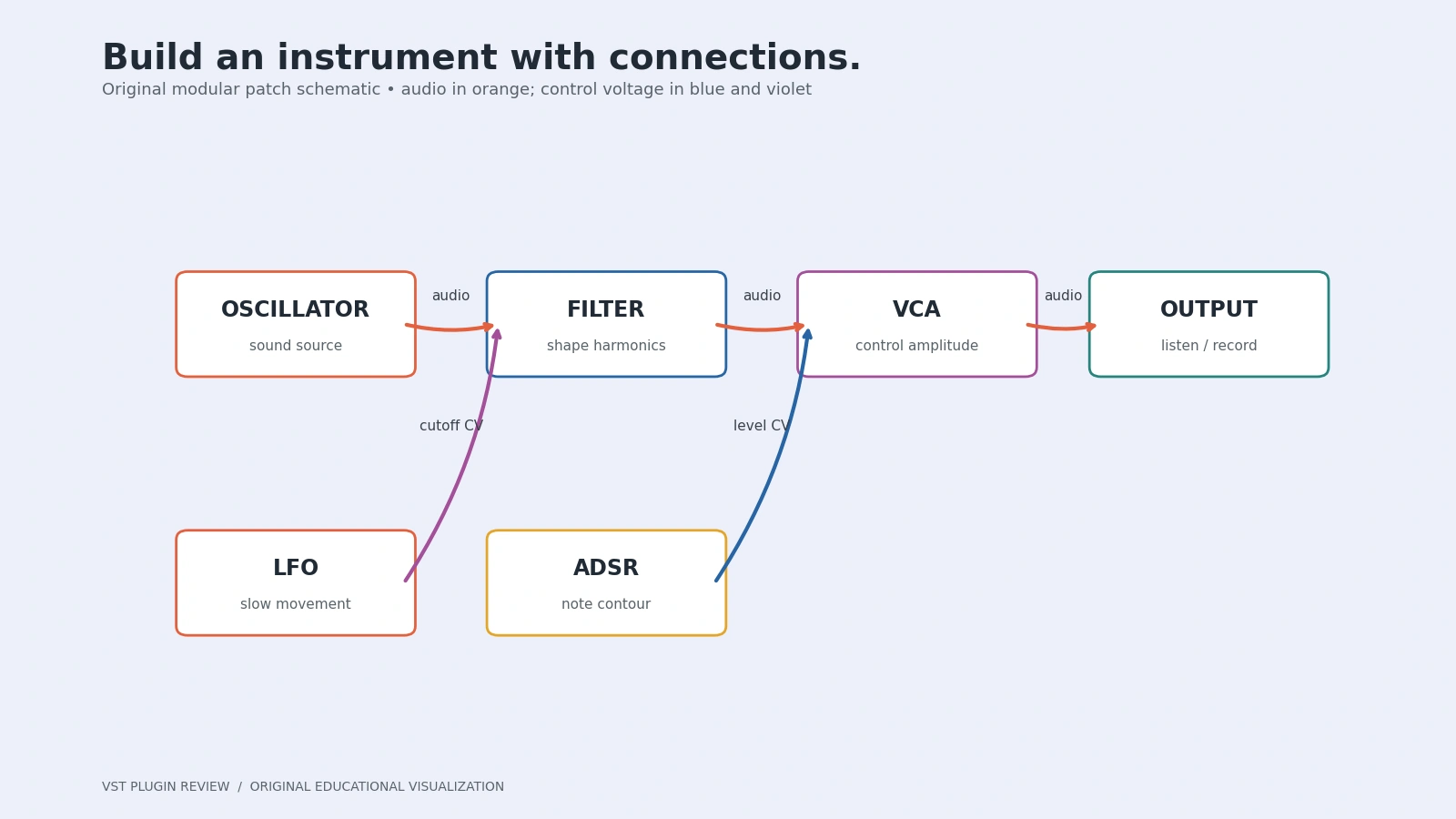
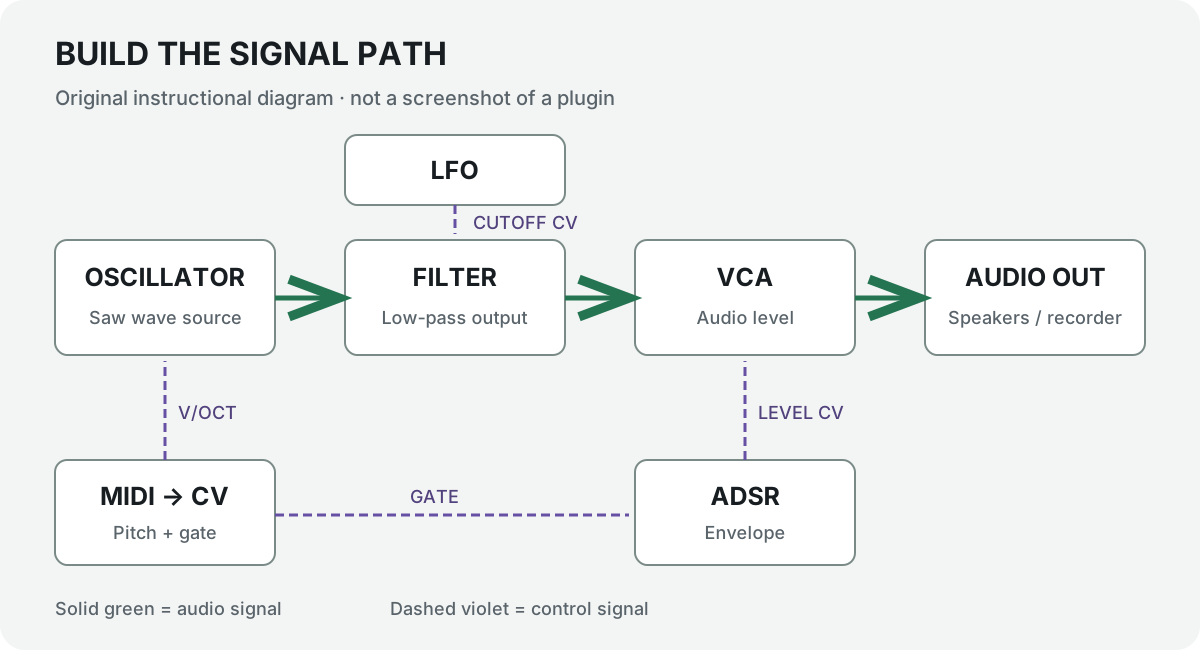
Start by separating the audio path, which you hear, from the control path, which changes how the sound behaves. An oscillator-to-filter cable normally carries audio. A keyboard-to-oscillator pitch cable normally carries control voltage, often shortened to CV. Both are changing signals; the distinction describes their purpose in this patch.
A VCA's audio input accepts the sound to be controlled. Its CV input accepts a signal that changes the gain. Patching an envelope into the audio input instead of the CV input is a different operation, and usually will not create the note shape you intended. Read socket labels before connecting anything.
This distinction is a learning aid rather than a hard wall. Audio-rate modulation is fundamental to many synthesis techniques. You can deliberately send an oscillator into a frequency modulation input, for example. Learn the ordinary signal path first so experiments are choices rather than accidental wiring errors.
The essential modules
Oscillators and waveforms
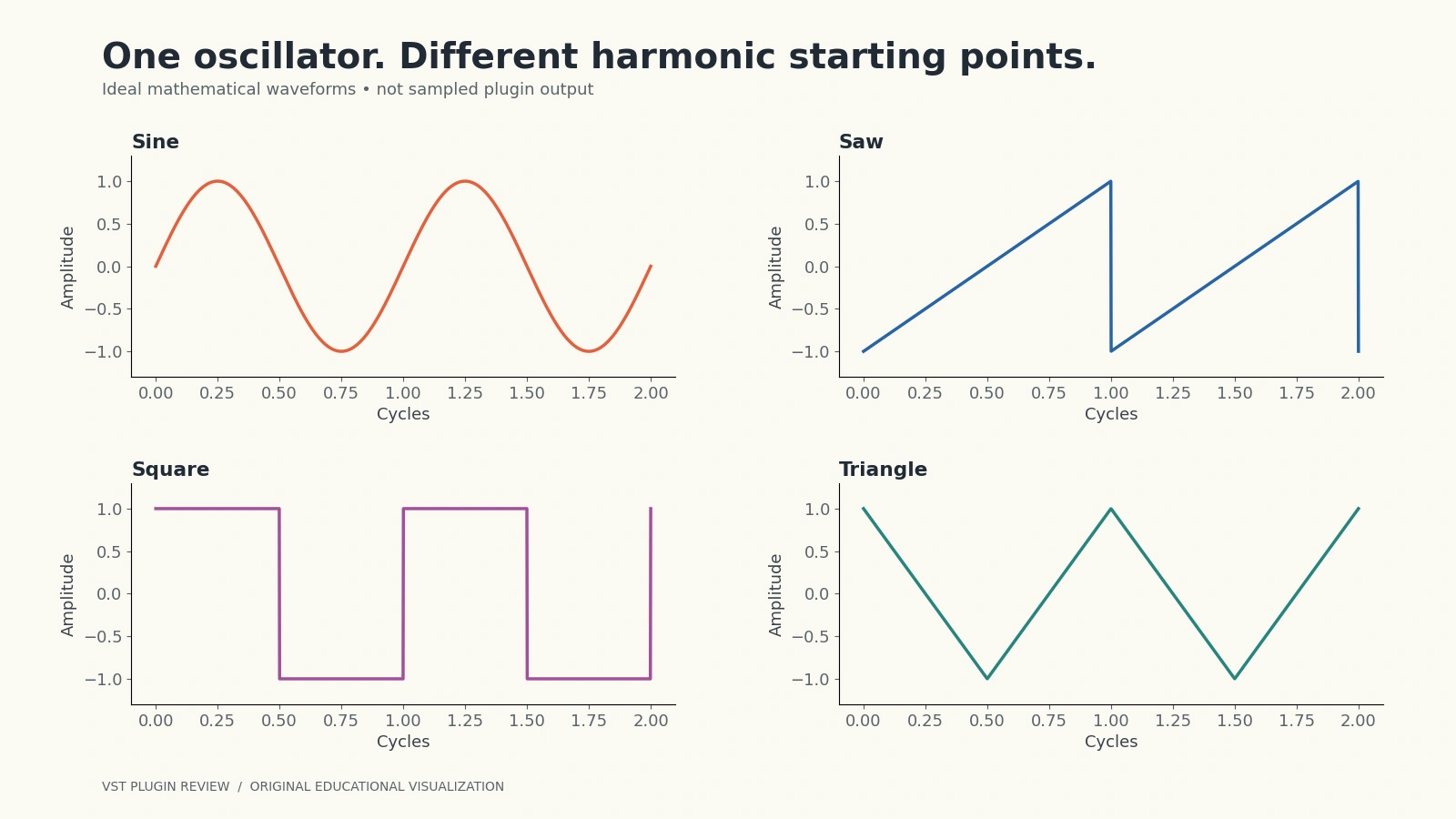
An oscillator produces a repeating signal. Its frequency determines how quickly it repeats, which usually determines perceived pitch. A sine has a smooth, single-frequency shape; a saw is rich in harmonics; a square or pulse provides another harmonic balance. A triangle is a useful softer starting point between a sine and brighter waveforms.
Choose a saw for the first patch because a low-pass filter can make its brightness change easy to hear. Begin with one waveform and one oscillator. Adding detuned layers immediately can hide tuning problems and make level changes harder to interpret. Complexity should answer a musical need.
Pitch tracking commonly uses a volts-per-octave input. In a one-volt-per-octave system, increasing pitch control by one volt doubles the oscillator frequency. A keyboard converter translates MIDI notes into that control signal. Pitch is separate from the gate that tells the instrument when a note starts and ends.
Filters: subtracting and emphasizing
A low-pass filter reduces frequencies above its cutoff region. A high-pass reduces the lower part of the spectrum, and a band-pass emphasizes a region between lower and upper limits. These descriptions are gradual responses rather than perfectly sharp walls. Filter slope and resonance affect what happens around the transition.
Resonance emphasizes frequencies near the cutoff and can make a sweep more pronounced. Start low. Turning resonance up while monitoring loudly is an unnecessary surprise, and some filter designs can oscillate. First listen to a slow cutoff movement with moderate input level; learn the basic tone before exploring extreme behavior.
VCAs: controlling level with another signal
A voltage-controlled amplifier changes a signal's gain in response to CV. For ordinary notes, an envelope opens the VCA at the start and closes it afterward. Without that arrangement, an oscillator may drone continuously. A VCA can also control modulation depth, making it useful well beyond the final audio stage.
Do not assume every VCA closes when no cable is attached. Some include a manual level or bias that keeps it open. For this tutorial, set the manual level so the envelope provides the intended control, then confirm the sound becomes silent when the envelope reaches zero.
ADSR envelopes
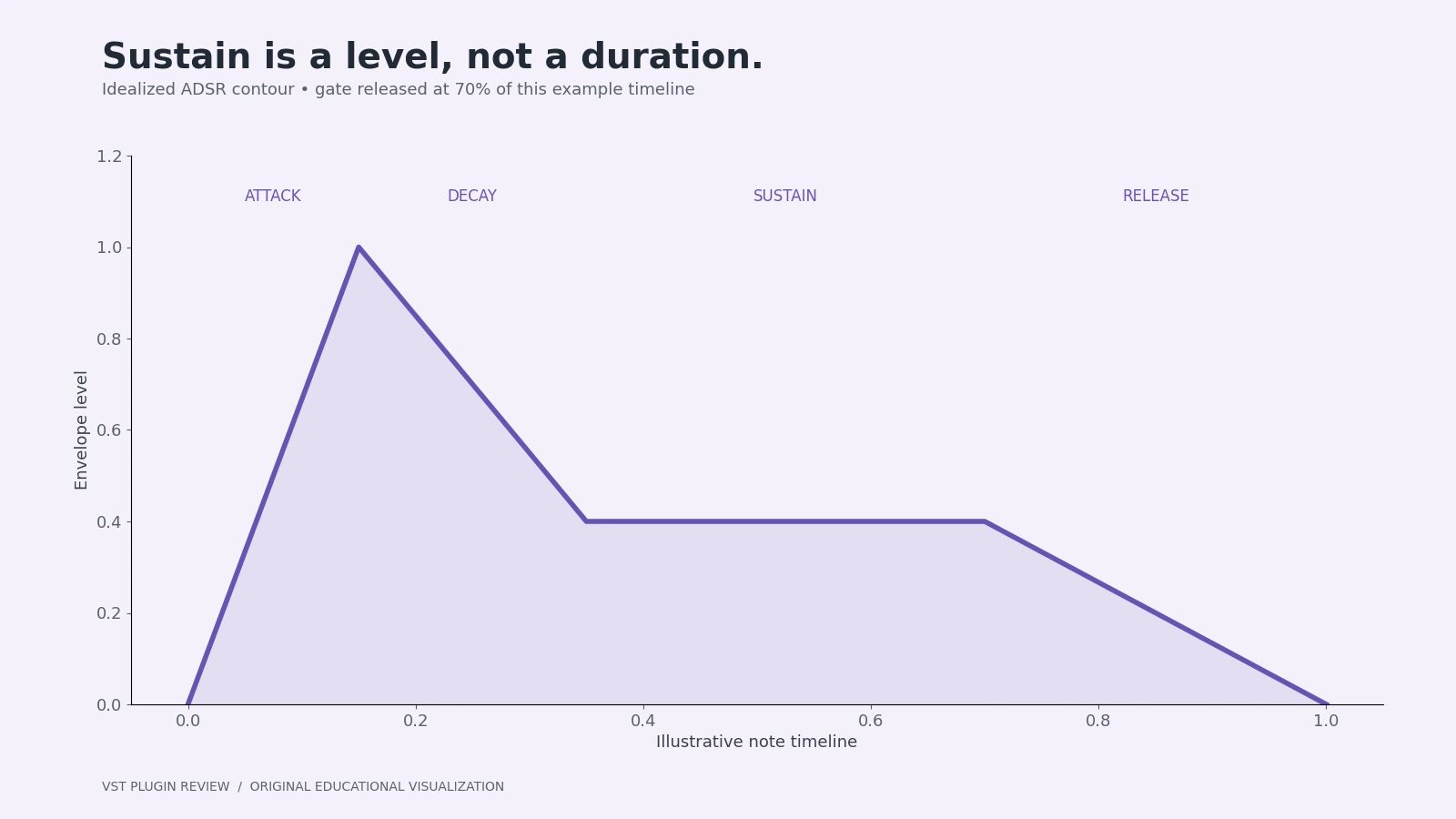
An ADSR envelope describes four stages. Attack moves upward after the gate begins. Decay moves toward the sustain level. Sustain is a level held while the gate remains high. Release moves back down after the gate ends. Sustain is not a duration, which is an especially common beginner misunderstanding.
A short attack, moderate decay, low sustain and short release makes a plucked shape. A longer attack and release makes a swelling pad. If a very short gate ends during the attack, the envelope may never reach its peak. Diagnose the timing of the controller as well as the envelope settings.
LFOs, gates and triggers
A low-frequency oscillator produces repeating motion. A slow sine can gently move cutoff; a square can switch between two states. Depth matters as much as speed. A modest movement around a useful base cutoff is often more controllable than sweeping across the entire filter range.
A gate remains high for a period, such as the length of a held note. A trigger is a brief pulse used to start an event. A sequencer advances when it receives the appropriate clock event. These signals are related but not interchangeable in every module: consult the destination's behavior before expecting a trigger to hold an ADSR sustain stage.
Choose your software platform
The official VCV Rack product page lists Rack 2 Free as an open-source standalone application. Rack 2 Pro adds DAW plugin operation, including VST2, VST3, Audio Unit and CLAP. The listed download was 2.6.6 and the Pro page displayed US$149 when checked; checkout, taxes and future updates can change the final terms.
Start with Free for this tutorial. Do not buy Pro simply to learn cable routing. If saving an instrument directly inside a DAW is essential, check the current Pro compatibility list and your host's supported formats before paying. A plugin running in a DAW and a standalone application routed through an audio interface are different workflows.
Cardinal is a free, open-source alternative with standalone and several plugin formats. Its modules are bundled rather than loaded from the external VCV Library, so a Rack patch that uses a particular third-party module may not transfer directly. Choose it for its documented self-contained approach, not an assumption that every Rack extension will work.
Voltage Modular Nucleus is Cherry Audio's free introductory collection. Its official page lists 22 modules and over 130 presets. Paid collections expand that environment; Nucleus should not be confused with an unrestricted entitlement to every Voltage Modular module. Installation and account requirements belong to Cherry Audio's current download process.
Build your first VCV Rack patch
The following sequence uses the included VCV modules and the official getting-started guide. Labels can differ across releases. Save a new patch early, keep output low, and verify one connection at a time rather than building the whole instrument before listening.
1. Install and configure audio
Download the appropriate Rack installer from VCV, not a third-party repack. Launch it and configure the Audio module's driver and device. Choose the output actually connected to your headphones or speakers. On Windows, use the interface manufacturer's supported ASIO driver when applicable; use a supported system driver for your platform.
Start with a conservative buffer. If playback crackles, increase it before assuming a synthesis error. Smaller buffers can reduce playing latency but demand more reliable real-time processing. Keep the engine and device sample rates aligned where practical, and lower the hardware monitoring level before connecting an oscillator.
2. Create a small, empty patch
Use a new patch and add Audio, MIDI-CV, VCO, VCF, VCA and ADSR EG. The VCV Free module listing also includes LFO, SEQ 3, Quantizer and Scope for later steps. Place sources on the left, processors in the middle and output on the right.
Leave space for cables. A tidy patch is a diagnostic tool, not an aesthetic obligation. Save this as a separate learning project so experiments do not overwrite a useful performance patch. Avoid installing a large third-party library until the included modules make sense.
3. Add the oscillator
Choose the VCO's saw output for the first sound and put its base pitch in a comfortable middle register. Do not connect it directly to a loud speaker output. A continuously running oscillator is expected: the VCA will define when it becomes audible.
4. Add the filter
Connect the saw output to the VCF audio input and use its low-pass output. Open cutoff enough to hear some brightness and keep resonance modest. If the filter is almost completely closed, the patch can seem broken even though the connections are correct.
5. Add the amplifier
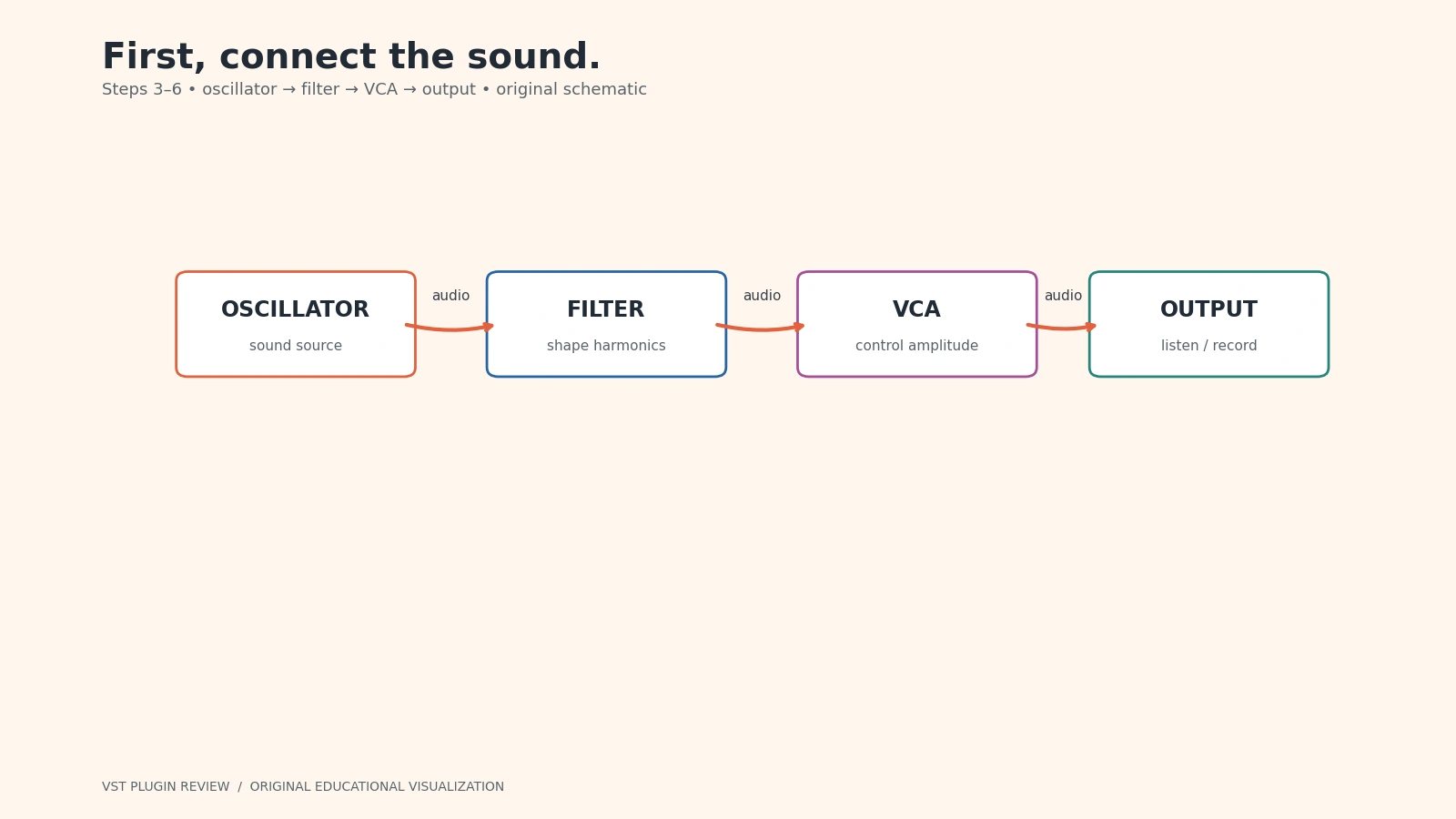
Connect the filter's low-pass output to the VCA audio input. Connect the VCA output to Audio's first output channel, and duplicate it to the second channel if you want the mono patch in both speakers. Do not put the second cable into a hardware input socket by mistake.
6. Check the complete audio chain
The intended chain is VCO saw → VCF audio input → VCA audio input → Audio output. Temporarily raise the VCA's manual gain very gently to confirm a quiet drone, then return it to envelope-controlled operation. This isolates audio routing from note control before introducing the keyboard.
7. Connect pitch and gate
Configure MIDI-CV for your controller, or select the computer keyboard driver described in VCV's Core module manual. Connect V/OCT to the oscillator's pitch input and GATE to ADSR's gate input. These two cables have different jobs: changing the played note should change pitch; holding it should keep the gate active.
8. Use ADSR to shape amplitude
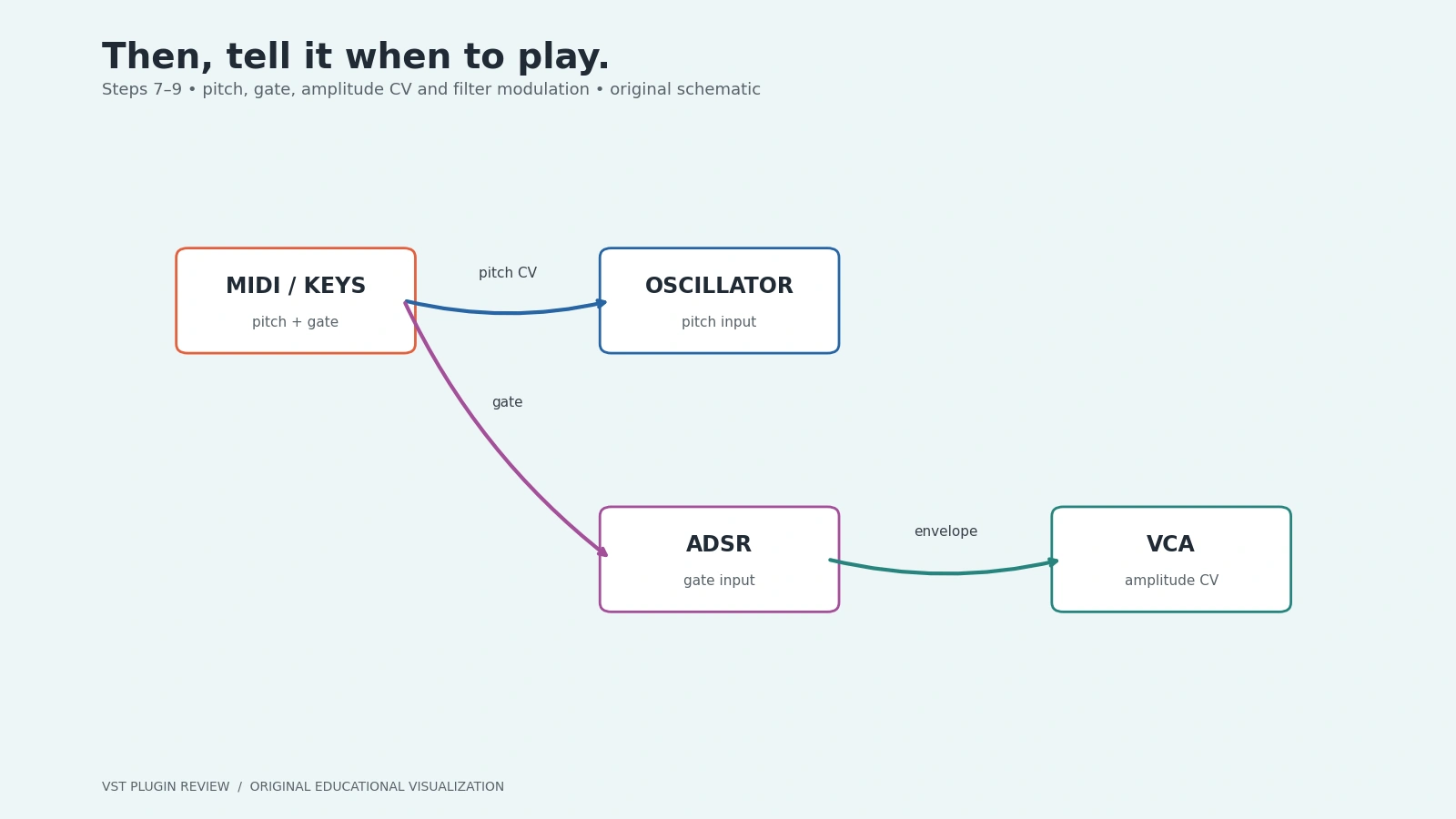
Connect ADSR's envelope output to the VCA CV input. Try an attack around 10 ms, a decay around 250 ms, sustain around one third of full level and a release around 150 ms. These are educational starting values, not a preset supplied by the developer. Adjust by ear at a moderate level.
Play short and long notes. Raise sustain and notice that long notes hold louder. Increase release and notice the sound continues after you let go. If the sound never stops, check manual VCA gain and whether the gate is stuck high before adding another module.
9. Add a slow filter movement
Add an LFO and patch a sine or triangle output to a cutoff modulation input on the VCF. Start with a slow rate, perhaps one movement over several seconds, and little modulation depth. If a depth attenuator is absent, insert an attenuation utility instead of applying the full signal.
Keep pitch modulation disconnected for now. Hearing a changing tone while the played pitch stays constant makes the purpose of the new cable obvious. Later, try an envelope on cutoff for a brighter attack that settles as each note decays.
10. Build a repeating sequence
Add SEQ 3 and Quantizer. Use the sequencer's internal clock, send one pitch row through Quantizer to VCO V/OCT, and route its gate output to ADSR gate. Disconnect or deliberately replace the keyboard pitch/gate connections; stacking multiple sources unintentionally makes debugging harder.
Set a short repeating pattern with a few distinct pitches. Enable gates for the steps you want to hear. Quantization restricts incoming values to selected notes; it is useful because arbitrary knob voltages need not correspond to a musical scale. Start slowly, then increase tempo once each step behaves as expected.
11. Record the result
The official VCV Recorder provides audio recording. Add it through VCV's documented installation process and patch the final mono signal to L/MON, or a genuine stereo pair to both inputs. Select a file path, check the meter, begin recording and stop after a few clean cycles.
Recorder is a separate module to obtain, not a reason to assume the Audio module automatically writes files. Alternatively, use a supported recording path into your DAW or interface. Record a short test, play it back, and check the beginning and end before committing a long performance.
12. Use a DAW when your edition supports it
For Rack Pro, select a supported plugin format in your DAW and follow VCV's host-specific guidance for MIDI and audio. Save both the DAW project and a patch backup. For Rack Free, export or record audio from the standalone environment and import that recording into the DAW instead of looking for a Free plugin installer.
Subtractive synthesis versus FM
The first patch is subtractive: a harmonically rich source is filtered and shaped. Frequency modulation changes an oscillator's frequency with another signal. Slow modulation can sound like vibrato, while audio-rate modulation can create additional spectral components and very different timbres.
For an experiment, save a copy, add a second oscillator and connect its output to an appropriately attenuated FM input on the first. Increase depth slowly. Expect pitch and brightness to interact, especially with non-linear or exponential responses. This is not simply a second oscillator mixed into the output.
Keep the original instrument intact while learning. If every experiment also changes tuning, envelope and output gain, you lose the reference that makes the new behavior understandable. A controlled comparison is more useful than deciding whether the altered patch sounds impressive for a few seconds.
Hardware Eurorack versus software
Hardware offers physical interaction and integration with compatible CV equipment, but a case, power supply, modules, monitoring and cables add practical costs. Power requirements, signal levels and connection standards matter. Never assume a software audio-interface socket is designed to send arbitrary hardware CV safely.
Software offers recall, duplication and a lower-cost learning route, subject to computer performance and licensing. A large patch can still overload an audio thread. Save versions and add modules deliberately. Learning what one VCA does will serve you in either format better than collecting oscillators without understanding gain control.
Troubleshooting by tracing the patch
| Symptom | Check first | Useful next step |
|---|---|---|
| No sound | Audio device, output channel and listening level | Temporarily test the audio chain at low manual VCA gain |
| Constant drone | VCA bias and envelope cable | Confirm the envelope returns to zero |
| Wrong notes | Pitch cable destination and octave | Bypass modulation and inspect the sequencer values |
| Notes too short | Gate duration and envelope release | Hold a keyboard note to isolate timing |
| Wild filter movement | Cutoff CV depth | Attenuate modulation before changing the source |
| Crackles | CPU load and device buffer | Simplify the patch and increase buffer size |
Frequently asked questions
Do I need music theory before learning modular?
No. Begin with one note and one envelope. Rhythm, tuning and harmony become useful as your goals expand, but the first task is understanding how a signal reaches the output. A repeating two-note sequence is enough to learn pitch control and gate timing.
Why does my oscillator keep running?
An oscillator commonly generates continuously. The envelope-controlled VCA turns that continuous source into audible notes. The keyboard gate is a control message, not an instruction that necessarily stops the oscillator itself.
Is VCV Rack Free a free VST plugin?
No. The checked product page distinguishes standalone Rack Free from Rack Pro's DAW plugins. Cardinal offers a different free plugin route with its own bundled modules and compatibility details. Treat edition names as functional requirements, not interchangeable labels.
What should I learn next?
Try velocity controlling VCA depth, an envelope controlling cutoff, then a sequencer controlling a timbral parameter. For percussion, read our kick synthesis guide. For a broader software toolkit, see free plugins for 2026. Keep useful experiments small enough to explain from input to output.